
Measure performance on every commit, on every architecture
Continuous benchmarking and autotuning that runs on real hardware. Results land directly on your pull request.
Why now
CI/CD was not built for performance
Performance regressions are hard to track, and autotuning typically requires dedicated engineers. Existing infrastructure was designed for correctness, not for measuring speed.
Generic CI/CD runners
GitHub Actions, GitLab CI, and Jenkins were designed to verify correctness on shared, multi-tenant VMs. System noise and varying hardware make benchmark results unreliable. A 5% regression disappears in the noise.
Multi-tenant VMs with unpredictable performance
No access to GPUs, accelerators, or custom silicon
Benchmarking requires custom scripting and maintenance
Agentic performance engineers
LLMs and coding agents are getting better at writing optimized code. What they lack is a way to verify suggestions on real hardware. CB/CT closes that loop: agents propose, the platform measures across every target, results feed the next iteration.
Agents propose, platform validates on real silicon
Multi-architecture feedback across x86, ARM, GPU
Data-driven autotuning closes the optimization loop
Our approach
Hardware-in-the-loop benchmarking and autotuning
Every benchmark runs on dedicated, isolated hardware. Every autotuning decision is backed by real execution data. Choose our managed cloud or install runners on your own machines.
Managed cloud
Our hardware pool spans x86, ARM, NVIDIA, AMD, and Tenstorrent processors. Bare-metal isolation eliminates system noise. You push code, we return stable, reproducible numbers.
Bare-metal execution, no noisy neighbours
Multi-architecture coverage out of the box
Zero infrastructure to provision or maintain
Self-hosted runners
Install our lightweight runner agent on your own hardware. Same benchmarking and autotuning pipeline, running on the exact machines your software ships to.
Benchmark on your actual deployment targets
Data stays within your infrastructure
Supports any processor the runner can access
How it works
From git push to performance report
Three steps. No custom benchmarking code. No performance engineering required.
Connect Your Repository
Install the GitHub app. From that point on, every push triggers a benchmarking pipeline.
Compile on Real Hardware
Your code is compiled and executed in parallel across x86, ARM, NVIDIA, AMD, and Tenstorrent processors. You get numbers from real silicon, not estimates.
Review, Tune, Ship
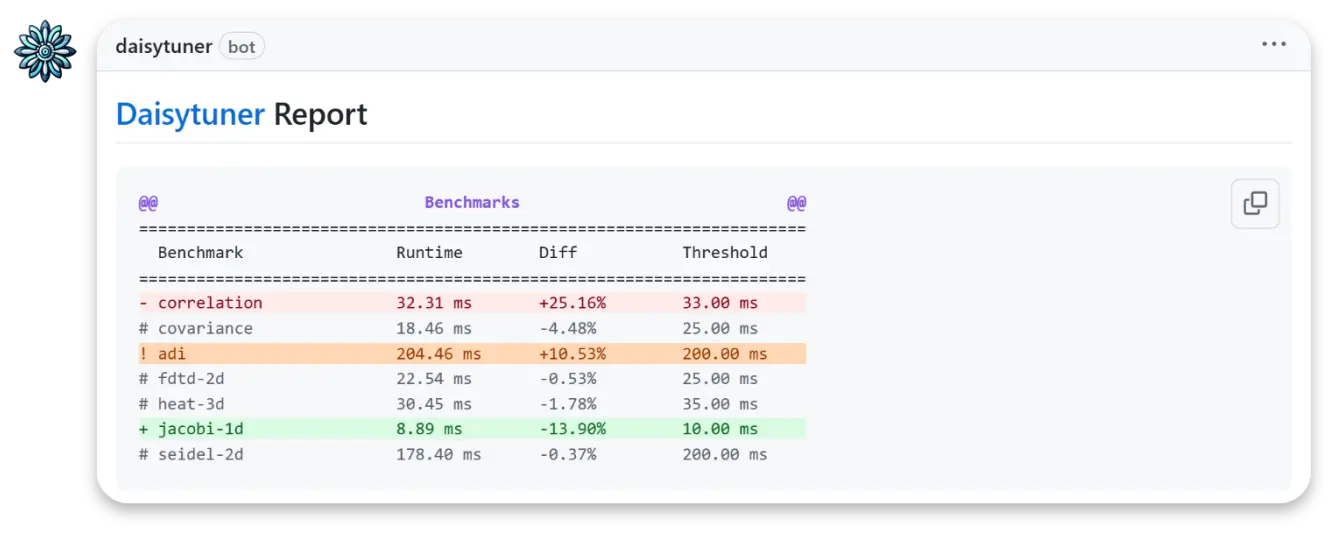
Regressions are flagged directly on your pull request. The autotuner explores thousands of optimization strategies and suggests the fastest configuration before you merge.